Tampilkan postingan dengan label Camera. Tampilkan semua postingan

Minggu, 15 November 2009

Canon PowerShot SX1 IS


Would you pay as much for a megazoom as you would for a dSLR? That's the question you need to answer before plunking down the same amount of cash for the Canon PowerShot SX1 as you would for the EOS Rebel XS or the Nikon D60 with their 18-55mm lenses. Packing some higher-end features over its brother, the SX10 IS, including a CMOS sensor (albeit the same 1/2.3-inch size and 10-megapixel resolution), 30fps 1080p HD movie capture, and support for raw files, the SX1 delivers slightly better performance and image quality as well.

Physically, it's almost identical to the SX10, including the same 20x 28-560mm equivalent lens. It's equally comfortable to hold and shoot, retaining perks like the articulated LCD and four AA-powered operation. It's a little heavier, 1.5 pounds, which makes it feel like a dSLR, but the big grip gives you plenty of holding room. A button to jump into review mode sits near the indented thumb rest on the back, joined by the exposure compensation and focus area selection buttons. Because the SX1's body is matte black plastic, rather than the reflective graphite of the SX10, the light blue labels are easier to see.

On the right side of the back is a dial concentric to a four-way navigation switch with the function button in the middle. Although I generally like the controls, the dial feels too mushy; like the SX10's, it doesn't respond appropriately, as if it needs to spin too far or not as far for any given operation. As a result, for example, I frequently overshot desired shutter speeds. It really feels like it needs better tactile feedback. The zoom switch didn't feel terribly exact, either. This is a typical problem with stepped zooms (these lenses don't really cover a continuous zoom range, instead stopping at a series of preset distances).

Of course, the flip-and-twistable LCD remains a user favorite, and the SX1's is a wide-aspect 2.8-inch model compared with the 4:3 aspect 2.5-incher on the SX10. Keep in mind that when you're shooting photos at full resolution in 4:3 aspect, the effective image size of the LCD is as if it were a 2.5-inch model. Canon does use the extra area on the sides for displaying some information. Unfortunately, the electronic viewfinder isn't particularly great. It updates slowly and looks pretty coarse.

More annoyingly, the camera lacks a dedicated toggle between the LCD and EVF. Instead, you have to cycle through the four display settings: low-info LCD, detailed LCD, low-info EVF, detailed EVF. That makes it nearly impossible to quickly jump back and forth. Similarly, though there's a dedicated movie record button, moving between capturing HD movies and standard 4:3 stills can get confusing. You have to press a button to toggle between the two aspect ratio modes, and the camera captures in whatever your indicated settings are for that aspect ratio: press button for 16:9, start movie record, stop movie record, press aspect button, press shutter for photos. It sounds simple, but I frequently forgot to toggle the aspect ratio back after shooting a movie, and ended up shooting lower-resolution, wide-aspect stills. And raw isn't available in 16:9 mode, which can complicate mistakes like that. You should be able to set a movie size and only have to worry about pressing record. A final annoyance: it remembers all your settings when you power off except the current metering mode. None of these seriously detract from the overall usability of the camera, but forgetful shooters (like me) or infrequent ones might find themselves having a few more settings accidents than they'd like.
Though a movie mode remains on the dial, it's become rather superfluous; in addition to the dedicated button, Canon integrated the movie resolution settings into the function menu along with the standard white balance, color adjustment, exposure bracketing, flash compensation, metering, and still size and quality controls.

Some of the more novel features include a Face Self-timer, which shoots a specified number of seconds after a face is detected, and a custom timer, which lets you also specify the number of shots to take (sort of a limited intervalometer, since you can only take up to 10 shots). As with the SX10, this camera introduces Canon's Servo AF, the company's AF tracking mode. With this camera, since the continuous shooting is so slow, I find the Servo AF has too much time to get confused, and since EVFs black out when a shot's taken, you can't verify that it's focusing on the right thing; I have lots of in-focus fences and out of focus people in my test shots. (And lest you suggest I should have used the Face Detect AF, that doesn't work unless you're shooting faces looking at you, not moving crowd shots.) I find the Servo AF less than useful since EVFs black out when a shot's taken so you can't verify that it's focusing on the right thing. The rest of the capabilities, for the most part, are the same as the competition. These include PASM, full auto, and a handful of scene modes; my favorites are a custom setting slot on the mode dial and 3.9-inch macro and zero(!)-inch Super Macro modes.
Read rest of entry

Olympus E-30


With a price gap of about $500 between Olympus' consumer models and the E-3, Olympus has long had a pretty big hole in its dSLR lineup--a hole populated by extremely popular competitors such as the Nikon D90, the Canon EOS 40D, and the Canon EOS 50D. However, with the E-30, it looks as if Olympus enters the ring swinging. It has a host of attractions, including a 12-megapixel Live MOS sensor, articulating LCD, fun (if not terribly practical) Art Filters, sensor-shift image stabilization, and built-in 3-group wireless flash controller, plus very nice photo quality and fast performance.
Like all of Olympus' dSLRs, the E-30 is based on the Four Thirds system, which combines sensors half the size of a frame of 35mm film and the same 4:3 aspect ratio with a standard lens mount. The resulting magnification factor is 2x, compared with 1.6x (Canon) and 1.5x (all others). As of this review, you can buy it in two "official" configurations: body only and in a kit with the 14-42mm (28-84mm equivalent) lens. I tested it with the consumer-grade Olympus 9-18mm f4-5.6 lens (18-36mm equivalent) and the higher-grade 12-60mm f2.8-4 SWD lens. My advice: If you're planning on spending more than $1,000 for a body, don't skimp on the lens; though a lot more expensive, the 12-60mm is far nicer and more flexible than the 14-42mm kit lens. On a side note, the lenses in general seem a bit noisy to me.
The E-30 is similarly designed to the E-3 but makes some notable deviations. It lacks the complete dust and weather sealing of its older sibling, and in fact the chassis is made of fiberglass-reinforced plastic (the D90 is plastic as well). In contrast, the 50D has at least partial magnesium alloy construction. The E-30 nevertheless feels sturdy, comfortable to grip, and the lack of metal makes it a bit lighter: 1.7 pounds to the 50D's 1.9.
On the top left, the mode dial contains the usual assortment of exposure mode options: Program, aperture/shutter-priority, and manual (PASM); the most frequently used scene program modes; full auto; and Art/Scene, in which you can select from the handful of Olympus' new Art Filters or an additional set of scene program modes. The right side has back and front control dials--a nice touch since many manufacturers have jettisoned at least one dial--plus a full status LCD display. ISO (100 through 3,200), drive mode and white balance buttons bring up their respective options to scroll through; ditto for the AF (single, continuous and manual, plus AF and single with manual override) and metering (Digital ESP/evaluative, center-weighted, and shadow, highlight and standard spot) buttons. The AF and metering buttons together allow you to set exposure bracketing of up to five frames in 1/3, 2/3, and full stop increments.
On the opposite side of the body sit a programmable function button and AF area selection button. Not only does the E-30 have the same AF system as the E-3, but it also has the same options as well, including the capability to select from groups of AF points, which can come in quite handy if you're frequently shooting off-center subjects. The Fn button can enable/disable face detection, invoke Live Preview, set manual white balance, override the current AF area setting, switch between auto and manual focus, override raw+JPEG shooting or vice versa, shoot an unsaved preview shot, use your custom My Mode settings, and display the electronic level. Unfortunately, the My Mode implementation is pretty unusable. The camera has two My Mode slots for custom settings, but the only way to choose between them is to dive deep into the setup menus, and then the only way to invoke that particular mode while shooting is via the Fn button. I tend to think that custom settings are important enough to merit a standalone control or at least be accessible via the LCD control panel (it only tells you which mode is active).
One thing that has begun to really bother me about Olympus' selection interface within the menus is that it forces you to scroll through all the options while thinking there are shortcuts. For instance, when selecting an ISO, it displays three rows of options--Auto, 100, 125, 160 in the first row, 200, 250, 320, 400 in the second, and so on. But you can't use the up and down keys to go from one row to the next; you have to scroll to the end to get to the next row. While most systems usually require that you scroll through all the options, the annoyance is that Olympus' visual cues lead you to believe you can do otherwise.
Pressing the OK button centered in the four-way navigation switches brings up the Super Control Panel on the LCD. You can access almost every setting through the display. Some not previously mentioned include sharpness, saturation, contrast and gradation (normal, low key and high key), plus the Picture Mode presets (and custom settings) that encompass those; white balance, which includes manual tweaking along amber/blue and green/magenta sliders; and flash compensation and intensity. Toggling the display using the Info button brings up a pair of digital levels which show pitch (forward/backward) and roll (z-axis rotation) information; the roll display can appear in the viewfinder as well. At the bottom beneath the power switch sits the IS button, which controls the sensor-shift stabilizer mode. In addition to a mode for horizontal panning the E-30 also has a mode for vertical panning. This model also introduces an interesting multiple-exposure mode, which I didn't get much of a chance to play with.
Of course, right in the middle of the camera back is the flip-and-twist 230,000-dot 2.7-inch LCD. Though it's a bit smaller than the 3-inch versions on most competitors, I'd gladly exchange that tiny bit of screen real estate for the flexibility of the articulated LCD. Otherwise, the display is pretty typical; bright enough for viewing under a variety of lighting conditions, but not accurate enough to make serious decisions about color or exposure tweaks. The viewfinder is pretty good as well: it's large and bright, with plenty of information. And while it doesn't offer 100 percent coverage, it's pretty close at 98 percent--better than the 50D's 95 percent and the D90's 96 percent
Read rest of entry

Sony Cyber-shot DSC-W130


Sony inches its Cyber-shot W-series of compact snapshot cameras forward with the Cyber-Shot DSC-W130. This 8-megapixel shooter sports a shiny, colorful new shell and a slightly longer lens, but otherwise feels like a carbon copy of its predecessor, the Cyber-shot DSC-W90.
Rounded corners and an attractive brushed metal front plate give the W130 a more stylish look than the W90. Available in silver, black, and pink, it offers some choices for gadget color coordination (though not as much as its 7-megapixel little brother, the DSC-W120, which comes in black, silver, pink, and blue). Besides the new look, the W130 gets a tweaked control layout from the W90. While it still uses irritatingly small, circular buttons for menu control, the buttons are laid out comfortably around the camera's direction pad and feel much more accessible to large-thumbed users.
Despite the makeover, the W130 offers few differences from its predecessor. The camera's 32mm- to 128mm-equivalent, f/2.8-5.8 lens is the only significant upgrade, offering a slightly longer zoom and wider angle than the W90's 35mm- to 105mm-equivalent lens. The W130 keeps the W90's 8-megapixel resolution, 2.5-inch LCD, and optical viewfinder. It also includes the W90's face detection function with Smile Shutter, a handy mode that lets the camera automatically take pictures of subjects when they smile. It gets a slight downgrade in the internal memory department, carrying only 15MB of space instead of the W90's 31MB. Of course, you should never rely on internal memory, so either camera would require you to pick up a Memory Stick Duo for shooting more than a handful of photos.

A generous set of onboard photo retouching and viewing features lets you tweak the photos you shoot with the W130. The camera can trim and rotate (in 90-degree increments) your pictures after you take them, and digitally remove red eyes. It can also apply sharpening, soft focus, and a variety of other effects to adjust your pictures. Most of these effects feel more like silly toys than useful features, but they can still be fun to play with. The W130 can also display photo slide shows with MP3 music soundtracks, either on the camera itself or (with an optional cable or cradle) on your HDTV.
The W130 performed quickly in our lab tests, with the exception of its flash, which took a long time to recycle. After a 1.8-second wait from power-on to first shot, the camera could capture a new picture once every 1.4 seconds with the onboard flash turned off. With the flash enabled, however, that wait doubled to 2.8 seconds. The shutter feels pleasantly responsive, lagging only 0.4 second with our high-contrast target and 1 second with our low-contrast target. In continuous shooting mode, the W130 captured 15 full-resolution shots in 7.5 seconds for a respectable rate of 2 frames per second.
Read rest of entry

Canon PowerShot SD790 IS Digital Camer


The PowerShot SD790 IS is another notch in the belt for Canon's Digital ELPH line. This camera's slick design, speedy response time, and myriad features (including image stabilization and motion detection) make it one of the top in its class. Most important, the 10-megapixel sensor (paired with a 3X optical zoom) produces fantastic photos.
The SD790 introduces a new spin on the Digital ELPH's control system with a reinvented control wheel. Previous models had touch-sensitive wheels, too—this one's so sensitive that it'll probably take some getting used to—but the one on the SD790 physically moves. After a few shots it proves very effective, helping you quickly navigate menus and access settings such as scene modes, ISO, and flash.
Adding to the 6-ounce camera's sleek feel is the fact that none of the controls protrude from the surface except the shutter button. The playback, print, display, and menu buttons are flat on the body of the camera, and yet are easy to press. They're also easy to reach with your right thumb, just to the side of the 3-inch LCD. And the zoom is conveniently located as a toggle around the shutter button.
The LCD, meanwhile, is all that you could ask for. Translating scenes in accurate and clear detail, it makes framing shots easy. That said, it would be nice to have an optical viewfinder, if just for backup or to extend battery life.
But the real draw is the camera's image quality. In daylight, shots are crisp and clear. We took a photo of a bed of tulips on a cloudy day, and it came out bright and colorful. There tends to be a bit of shadowing when using the flash, but nothing too bothersome or unexpected. At lower ISO settings, images are near-perfect. And in darker settings at ISO of up to 800, pictures are still in the clear. Problems crop up only around ISO 1600, with noise and blurriness marring most images. Image quality in movie mode was more than adequate. The SD790 also allows you to zoom in and out while shooting, with little noticeable blur.
The motion-detection technology and image stabilizer are also very impressive. When taking photos of passing cars on a street in bright sunlight, images came out surprisingly clear. And the camera's face-detection feature automatically sets the focus, exposure, flash, and white balance of a scene. Canon has also added a nifty feature that lets the automatic white balance focus on a subject's face, rather than the background, helping with skin tone and color.
As for settings, the SD790 is extremely versatile, offering 19 shooting modes and 12 special scene modes. The camera's also speedy. Startup lag time is almost nonexistent, coming in at less than a second. Shutter lag time is also very respectable, at 1.4 seconds, and shot-to-shot time is 3.7 seconds.
With its exceptional design, speedy response, and high-quality image production, the SD790 is worth every penny.
Read rest of entry

Sabtu, 31 Oktober 2009

Nikon SLR D90 Kit with AFS-DX VR 18-200mm


Description

· The Nikon D90 is a 12.3-megapixel DX-format camera. Fusing 12.3-megapixel image quality inherited from the award-winning D300 with ground breaking features, the D90's breathtaking, low-noise image quality is further advanced with EXPEED image processing.

Split-second shutter response and continuous shooting at up to 4.5 frames-per-second provide the power to capture fast action and precise moments perfectly, while Nikon's exclusive Scene Recognition System contributes to faster 11-area autofocus performance, finer white balance detection and more.

The D90 delivers the control passionate photographers demand, utilizing comprehensive exposure functions and the intelligence of 3D Color Matrix Metering II. Stunning results come to life on a 3-inch 920,000-dot color LCD monitor, providing accurate image review, Live View composition and brilliant playback of the D90's cinematic-quality 24-fps HD D-Movie mode.


Features


12.3-megapixel DX-format CMOS imaging sensor: Coupled with Nikon's EXPEED image processing technologies and NIKKOR optics, breathtaking image fidelity is assured

Continuous shooting as fast as 4.5 frames-per-second: Combined with fast 0.15ms power-up and split-second 65ms shooting lag, dramatic action and decisive moments are captured easily

D-Movie Mode-Cinematic 24fps HD with sound: Record cinematic-quality movie clips at up to 720p HD (1280 x 720 pixels) in Motion JPEG format, enhanced by NIKKOR interchangeable lens quality and versatility

Low noise ISO sensitivity from 200 to 3200: High signal-to-noise components and design deliver exceptional performance, even at high ISO setting

3-inch super-density 920,000-dot color LCD monitor: High resolution, 170-degree wide-angle viewing guarantees confident image review and movie playback

Built-in image sensor cleaning: Effective 4-frequency, ultrasonic sensor cleaning frees image degrading dust particles from the sensor's optical low pass filter

11-point AF system with Face Priority: Consistently fast and accurate autofocus, reinforced by the Nikon Scene Recognition System, delivers razor sharpness in a wide variety of conditions

One-button Live View: Easy to use Live View activates access to 3 contrast detection focus modes including Face Priority AF

Nikon 3D Color Matrix Metering II with Scene Recognition System: Nikon's renowned 420-pixel RGB 3D Color Matrix Metering II, teamed with the exclusive Scene Recognition System, evaluates images, referencing an on-board database of over 30,000 photographic scenes, for unmatched exposure accuracy

Comprehensive exposure control: Five advanced scene modes plus Program Auto, Shutter Priority, Aperture Priority and Manual

Auto Active D-Lighting: Selectable and Automatic, Active D-Lighting optimizes details within shadows and highlights, taming high-contrast situations in real time

Durable, high precision shutter: Testing to over 100,000 cycles assures shutter life and accuracy

In-Camera Image Editing: Creative freedom stems from exclusive in-camera image editing, featuring Fisheye effect, Straighten and Distortion Control as well as D-Lighting, Red-eye Reduction, Image Overlay, Monochrome and more

GPS geo-tagging: GP-1 GPS unit (optional) provides automatic real-time geo-tagging


Specifications


System Requirments
Image Sensor Format
DX
Image Sensor Type
CMOS
Sensor Size
15.8 x 23.6mm
Total Pixels
12.9 million
Effective Pixels
12.3 million
Image Area (L) DX Format
DX-format: (L) 4288x2848, (M)3216x2136, (S)2144x1424
Top Continuous Shooting Speed
4.5 frames per second (full resolution)
Continuous Shooting Options (CH)
DX-format: CH: Up to 4.5 frames per second; CL: Up to 4 frames per second
LCD Monitor Size
3 in. diagonal
LCD Monitor Type
Super Density
LCD Monitor Resolution
920,000 Dots
LCD Monitor Angle of View
170-degree wide-viewing angle
LCD Monitor Adjustments
Brightness, 7 levels
Shutter type
Electronically controlled vertical-travel focal-plane
Slowest Shutter Speed
30 sec. in steps of 1/3, 1/2, 1 EV
Fastest Shutter Speed
1/4000 sec. in steps of 1/3, 1/2, 1 EV
Bulb Shutter Setting
Yes
Lowest Standard ISO Sensitivity
200 in steps of 1/3, 1/2, 1 EV
Highest Standard ISO Sensitivity
3200 in steps of 1/3, 1/2, 1 EV
Lowest Expanded ISO Sensitivity
Lo-1 (ISO 100 equivalent)
Highest Expanded ISO Sensitvity
Hi-1 (ISO 6400 equivalent)
Expanded ISO Sensitivity Options
Lo-1 (ISO 100 equivalent) in steps of 1/3, 1/2, 1 EV
Hi-1 (ISO 6400 equivalent) in steps of 1/3, 1/2, 1 EV
Storage Media
SD
SDHC
Storage System
JPEG: JPEG-baseline-compliant; can be selected from Size priority and Optimal Quality
AVI
Compressed 12-bit NEF (RAW)
File System
Compliant with DCF 2.0
DPOF
EXIF 2.21
Exposure Modes
Programmed Auto (P) with Flexible Program
Shutter-Priority Auto (S)
Aperture-Priority Auto (A)
Manual (M)
Auto Auto (flash off) Advanced Scene Modes
Advanced Scene Modes
Portrait
Landscape
Close-up
Sports
Night Portrait
Exposure Metering System
420 pixel RGB sensor 3D Color Matrix Metering II
Center-weighted
Spot
Metering Range
1) 0 to 20 EV (Matrix or center-weighted metering); 2) 2 to 20 EV (Spot metering) (ISO 100 equivalent, f/1.4 lens, at 20 degrees C/68 degrees F)
Exposure Meter Coupling
CPU
Exposure Compensation
±5EV in increments of 1/3, 1/2, 1
Exposure Lock
Yes
Exposure Bracketing
Yes, 2 or 3 frames in steps of 1/3, 1/2, 2/3, 1 or 2 EV
Shutter Release Modes
Single-frame [S] mode
Continuous low-speed [CL] mode; 1-4 frames-per-second
Live View [LV] mode
Self-timer mode
Continuous high-speed [CH] mode: 4.5
Movie Modes
Movie with sound
HD 1280 x 720/24 fps VGA 640 x 424/24 fps QVGA 320 x 216/24 fps
White Balance
Sun
Shade
Fluorescent
Incandescent
Flash
Preset
Fine Tune by Kelvin color temperature setting
Auto Auto (TTL white balance with 420-pixel RGB sensor) Seven manual modes with fine-tuning; Sun Shade Fluorescent Incandescent Flash Preset Fine Tune by Kelvin Color temperature setting
White Balance Bracketing
Yes, 2 or 3 exposures, in increments of 1, 2 or 3
D-Lighting Bracketing
2 exposures
Playback Functions
Full frame
Zoom
Slideshow
Pictmotion
Histogram
Shooting data
Highlight point display
Auto image rotation
Sound playback
D-Movie playback Thumbnail (4, 9, 72 segments)
Calendar
Interface
Hi-speed USB
NTSC
HDMI
Lens Mount
Nikon F bayonet mount
Compatible Lenses
1) DX AF NIKKOR: All functions possible
2) D-/G-type AF NIKKOR (excluding IX NIKKORlenses): All functions possible (excluding PC Micro- NIKKOR)
3) AF NIKKOR other than D-/G-type (excluding lenses for F3AF): All functions except 3D-Color Matrix Metering II possible
4) AI-P NIKKOR: All functions except Autofocus, 3D-Color Matrix Metering II possible
5) Non-CPU AI NIKKOR: Autofocus not supported. Can be used in exposure modes A and M but exposure meter does not function
Picture Angle
1.5
Viewfinder
-2.0 to +1.0 m-1
Viewfinder Frame Coverage
Approx. 96%
Viewfinder Diopter Adjustment
(-2.0 to +1.0 m-1)
Viewfinder Eyepoint
19.5
Reflex Mirror
Quick-return type
Interchangeable Focusing Screens
No
Viewfinder Magnification
Approx. 0.94
Depth-of-field Control
Yes
Autofocus System
Nikon Multi-CAM 1000 autofocus module with TTL phase detection, 11 focus points (including 1 cross-type sensor) and AF-assist illuminator (range approx. 0.5-3 m/1 ft. 8 in.-9ft.10 in.)
Maximum Autofocus Areas/Points
11
Autofocus Sensitivity
-1 - +19 EV (ISO 100, 20°C/68°F
Focus Modes
Single-servo AF (S)
Continuous-servo (C)
Manual (M) with electronic rangefinder
Live View autofocus; Face-priority, wide area, normal area
Single-point AF Mode
Yes
Dynamic AF Mode
Yes
Auto-area AF Mode
Yes
Focus Lock
AE-L/AF-L button
Half press of shutter-release button (single-point AF in AF-S)
Picture Control
Standard
Neutral
Vivid
Monochrome
Nine User-customizable settings
Portrait
Landscape
In-Camera Image Editing
Trim
D-Lighting
Color Balance
Image Overlay
Filter Effects
Monochrome
Color Balance
NEF (RAW) processing
Quick retouch
Straighten
Distortion Control
Built-in Flash
Yes
External Flash Shoe
Yes
Built-in Flash Distance
56 at ISO 200 ft.17 at ISO 200m
Dust-Off Reference Photo
Yes
Save/Load Camera settings
Yes
Nikon Creative Lighting System
Yes
Built-in Commander Mode 2 Groups: A/B 4 Channels: 1-4 TTL, Non-TTL Auto and Manual mode
Flash Sync Speed
Up to 1/200
FP High Speed Sync
Up to 1/4000
Flash Sync Modes
Front-curtain sync (normal)
Slow sync
Rear-curtain sync
Red-eye reduction
Red-eye reduction with slow sync
Flash Control
1) i-TTL: TTL flash control by 1,005-pixel RGB sensor, built-in flash, SB-900, SB-800, SB-600, SB-400: i-TTL balanced fill-flash and standard i-TTL flash
2) AA (Auto Aperture-type) flash: Available with SB-900 and SB-800 used with CPU lens
3) Non-TTL Auto: Available with Speedlights such as SB-800, 28, 27, and 22S
4) Range-priority manual flash; available with SB-900 and SB-800
Accessory Shoe
Yes
Self-timer
2, 5, 10, 20 seconds duration
World Time Setting
Yes
Date, Time & Daylight Savings Setting
Yes
Battery Type
Rechargeable
Battery / Batteries
EN-EL3e Lithium-ion Battery
AC Adaptor
EH-5a AC Adapter
Battery Charger
MH-18a Quick Charger
Image Comment
Yes
Battery Life (shots per charge)
850 shots (CIPA)
Tripod Socket
1/4-20
Supported Languages
Chinese (Simplified and Traditional), Dutch, English, Finnish, French, German, Italian, Japanese, Korean, Polish, Portuguese, Russian, Spanish, Swedish
Supplied Software
Software Suite CD-ROM
Approx. Dimensions Camera
Width 5.2 in. (132mm)
Height 4.1 in. (103mm)
Depth 3.0 in. (77mm)
Approx. Weight Camera
22 oz. (620g)
Read rest of entry

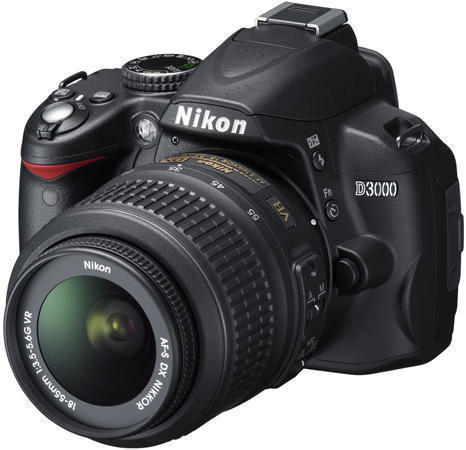
Nikon D3000 kit 18-55vr


Main Features


  • New Guide mode provides in-camera assistance for making camera settings and utilizing professional techniques
  • Large 3.0-in., approx. 230k-dot LCD with brightness adjustment
  • Nikon DX-format CCD image sensor, 10.2 effective megapixels
  • Integrated Dust Reduction System
  • Nikon’s exclusive EXPEED image processing system
  • Six scene modes that automatically adjust exposure, image processing, and other settings for superior image quality
  • Scene Recognition System, utilizing 420-pixel RGB sensor, improves autofocus, auto exposure and auto white balance performance
  • Active D-Lighting for smooth tone reproduction in high-contrast environments
  • Multi-CAM 1000 autofocus sensor module featuring 11 AF points provides fast and precise autofocus coverage across the frame
  • Picture Control System includes Portrait and Landscape options for more vibrant customized colors
  • Extensive palette of in-camera Retouch Menus including a new Miniature effect that modifies images to look like pictures of miniature models
  • Wide sensitivity range of ISO 100 to 1600; a Hi 1 setting increases sensitivity to ISO 3200
  • Viewfinder with approx. 95% frame coverage and an easy-to-view 18 mm eyepoint (at -1.0 m-1)
  • Up to 3 fps continuous shooting
  • Built-in pop-up flash with Nikon's original i-TTL flash control
  • Highly efficient energy-saving design that allows approx. 550 images on a single charge of the Rechargeable Li-ion Battery EN-EL9a (CIPA standard, with AF-S DX NIKKOR 18-55mm f/3.5-5.6G VR and flash fired at full power once every other shot.)
  • Included Nikon ViewNX software makes browsing and organizing your images easy
  • Optional photo-editing software Capture NX 2 allows quick and easy photo editing
  • Lightweight, compact body with softly rounded form

Specifications


Effective pixels

10.2 million

Image sensor

CCD sensor, 23.6 x 15.8 mm; total pixels: 10.75 million; Nikon DX-format

Image size (pixels)

3,872 x 2,592 [L]; 2,896 x 1,944 [M]; 1,936 x 1,296 [S]

Sensitivity

ISO 100 to 1600 in steps of 1 EV. Can also be set to approx. 1 EV above ISO 1600 (ISO 3200 equivalent), ISO sensitivity auto control available

Storage media

SD memory cards, SDHC compliant

Monitor

3.0-in., approx. 230k-dot TFT LCD, and brightness adjustment

Exposure metering

3D Color Matrix Metering II, Center-weighted, and Spot Metering

Exposure modes

Auto modes (auto, auto [flash off]), scene modes (Portrait, Landscape, Child, Sports, Close up, Night portrait), programmed auto with flexible program (P), shutter-priority auto (S), aperture-priority auto (A), manual (M)

Interface

Hi-Speed USB

Power source

One Rechargeable Li-ion Battery EN-EL9a

Dimensions (W x H x D)

Approx. 126 x 97 x 65 mm (5.0 x 3.8 x 2.6 in.)

Weight

Approx. 485 g (1 lb. 1 oz.) without battery, memory card, or body cap
Read rest of entry
tes
 

Label

Recommended Gadget

  • ads
  • ads
  • ads
  • ads

Digital Century21 Copyright © 2009 Gadget Blog is Designed by Ipietoon Sponsored by Online Business Journal